

You almost always heard the same thing whenever someone mentioned Linux: "Great operating system, but gaming? Forget about it."
For many gamers, Windows was simply the only real choice. You installed Steam, downloaded your games, and that was it. Linux was mainly something for people who enjoyed working with terminals and commands and wanted to customize every part of their computer.
But times have changed...
Thanks to Steam, Proton, and the growth of Linux gaming, the situation is completely different today. As of 2026, you can play a surprisingly large number of games on Linux without spending hours searching for solutions.
But is Linux really a replacement for Windows as a gaming platform? Or are there still things you need to keep in mind?
I have been using Linux as my daily operating system, and my experience has been clear: Linux gaming has improved massively, but the best experience depends on choosing the right tools for your needs.
🟢 Beginner: Steam on Linux: thanks to Proton, you can play more and more Windows games
If you ask me what the best way to game on Linux is today, the answer is simple: Steam with built-in Proton support.
This is one of the biggest reasons why Linux gaming has grown so much. Valve developed Proton as a compatibility layer based on Wine technology, allowing many Windows games to run on Linux directly through Steam.

So you don't have to install all kinds of extra programs yourself or spend hours looking for complicated settings. You install Steam, enable Proton when needed, and simply try launching your game.
As a gamer, you'll usually never even notice everything your Linux system is doing in the background when a game starts through Proton. And that's exactly how it should be!
You just want to click "Play" and start gaming, just like you're used to on Windows.
Why Proton has become so important
One major advantage of Proton is that Valve invests a tremendous amount of effort into it.
Thanks to the Steam Deck, Linux gaming has also received a huge boost. The Steam Deck runs SteamOS, a Linux-based operating system. Because of this, thousands of games have been tested and improved for Linux.
Of course, not every game works perfectly. Some games have issues with anti-cheat systems, which means certain popular multiplayer games are still difficult to play on Linux.
But for many single-player games and regular Steam titles, the experience is genuinely excellent today.
🟡 Advanced: for gamers who want to get even more out of Proton
The standard Proton versions included with Steam work very well for most gamers. However, sometimes a specific game may have issues with the default version.
That's where GE-Proton can be useful. It's a modified version of Proton maintained by the Linux community that can offer better compatibility for certain games.
With tools like ProtonUp-Qt, you can easily install additional Proton versions and use them for specific games.
This is especially useful when a game doesn't work properly with the default Proton version or if you enjoy experimenting with the best possible settings.
Want to install and use GE-Proton yourself? Then you can check out this helpful guide: Installing GE-Proton on Steam Deck, SteamOS, and Linux
🟡 Advanced: Lutris, Heroic, and other launchers: more freedom, but they require a bit more knowledge
Of course, there are other ways to play games on Linux as well. Programs like Lutris and Heroic Games Launcher are great examples.
These tools are especially useful if you own games outside of Steam. Think of GOG games, the Epic Games Store, or Amazon Games. Heroic gives you one central place to manage these games, while Lutris is best known for its broad support for different games and platforms.


They often work surprisingly well, but unlike Steam, you'll sometimes have to figure things out yourself.
For example, you may need to experiment with different Proton versions, Wine settings, or other configurations to get a game running perfectly.
Even Steam users sometimes have to search for the best Proton version, but Steam usually makes the process easier because everything is integrated into the platform.
Fortunately, Heroic also supports cloud saves for supported games, but it's still a good idea to know where your save files are stored. Not every game uses the same system, and keeping an extra backup is always recommended.
It would be a shame if you spent dozens of hours playing a game only for your save file to disappear because of an incorrect configuration or an update issue. That's why creating an extra backup of your important saves is always a good idea.
Heroic Games Launcher is also easy to install on Linux. For many Linux users, the Flatpak version is a convenient choice, because it works on many different Linux distributions without requiring much extra configuration.
For example, if you're using Manjaro, SteamOS, or another Linux distribution, you can easily install Heroic through Flatpak:
Download Heroic Games Launcher
So Lutris and Heroic are certainly not bad choices. Quite the opposite: they give Linux gamers an incredible amount of freedom.
But if you simply want to install a game quickly and start playing without much hassle, In my own experience, Steam with Proton is still the closest thing to a Windows-like gaming experience on Linux.
🟡 Advanced: DRM-free games: more freedom, but you need to be careful yourself
Besides Steam and other launchers, there are also DRM-free games. These are games without mandatory copy protection or a required launcher. You download the game, install it, and simply launch it.
For Linux gamers, this can be very appealing because it gives you more control over your own games. Services like GOG, for example, offer many DRM-free titles that you can keep forever.
However, DRM-free doesn't automatically mean a game will work on Linux. Many games are still built for Windows and may depend on specific software or settings.
Some games work perfectly through Proton or Wine, while others require additional configuration or may not work at all.
The biggest advantage is that you're not dependent on a mandatory launcher. You own the game files yourself and can keep them for as long as you like.
Just don't forget to back up your save files. With some DRM-free games, you'll need to create your own save backups, because there isn't always an automatic system like Steam Cloud.
🔴 Expert: tweaking Wine, prefixes, and configurations yourself
Linux gaming also gives you the opportunity to go far beyond the default settings. For gamers who enjoy experimenting, there are many additional possibilities.
A good example is managing your own Wine prefixes (separate environments where Windows games run). You can adjust specific settings, use different runtime versions, or manually solve problems when a game doesn't work right away.

This gives you a tremendous amount of control, but it also requires more knowledge. You need to understand how Proton, Wine, and the different compatibility layers work together.
For most gamers, this isn't necessary at all. Steam with Proton already works surprisingly well these days. But for people who love tweaking everything, Linux is especially interesting because it offers so much freedom.
🟢 Beginner: Minecraft and Roblox on Linux
Popular games like Minecraft and Roblox are also possible on Linux nowadays, even though they aren't available through Steam.
Minecraft is one of the best examples of a game that runs well on Linux. The Java Edition has official Linux support, and with launchers like Prism Launcher you can easily manage different Minecraft versions, mods, and modpacks.


Roblox is a different story. The game doesn't have an official Linux version and isn't available through Steam either. However, the Linux community has created solutions such as Sober , which allows Linux users to run Roblox.
You can find the official Roblox website here: Roblox .
This really shows how much Linux gaming has grown. Games that once seemed impossible to play now have community-driven solutions.
Not every game has such a solution, but it does show that Linux gamers have more and more options beyond the traditional Steam library.
🟢 Beginner: Cloud gaming works perfectly on Linux too
Don't have a powerful gaming PC? Then cloud gaming can be an interesting solution.
Services like GeForce NOW also work on Linux, even directly through your browser.
Your computer no longer has to render all the graphics itself.
Of course, you should still keep the following in mind:
- A fast internet connection
- A stable connection
- Sufficient data allowance
This means that even older hardware can still be used to play modern games, as long as your internet connection is fast and stable enough.
Related article

🟢 Beginner: Popular gaming software also works on Linux
A common reason why gamers avoid Linux is because they think they'll miss all kinds of software. But in practice, that's no longer really the case.
Many well-known gaming and content creation tools work very well on Linux today.
- Discord - chat with friends, communities, and gaming servers
- OBS Studio - record gameplay and livestream
- Steam - install and manage games with Proton support
- VLC Media Player - play videos and other media
- Blender - create 3D models and creative projects
- GIMP - edit images and thumbnails
- Audacity - record and edit audio
- Easy Effects - improve your microphone with filters such as noise reduction, equalizer, compressor, and limiter
Linux has also become increasingly attractive for gamers who create content. You can record gameplay, edit videos, create thumbnails, and livestream without being forced to use Windows.
Modern Linux systems are also increasingly using PipeWire instead of the older PulseAudio. As a result, audio devices and microphones are now much easier to use.
Of course, not every Windows application has a Linux version. Some exclusive software or certain anti-cheat systems are still reasons why some gamers continue to use Windows.
But for most everyday gaming and creative tasks, Linux offers a surprisingly large number of possibilities today.
My own Linux gaming setup
My favorite Linux distribution for gaming
For reference, I use Manjaro XFCE on my own PC. It is not the newest gaming machine, but thanks to Steam, Proton, and the right tools, it is still possible to enjoy many games on Linux.
There are countless Linux distributions available, but personally I think Manjaro is an excellent choice for gaming.
I personally use the XFCE edition of Manjaro. This desktop environment is lightweight, fast, and also works well on older hardware.
However, Manjaro also comes in other editions. For example, KDE Plasma is a popular choice for gamers who want a more modern and feature-rich desktop experience.
Why is Manjaro good for gaming?
Manjaro is a user-friendly Linux distribution that's well suited for gamers. The system remains easy to use, even if you don't have much Linux experience yet.
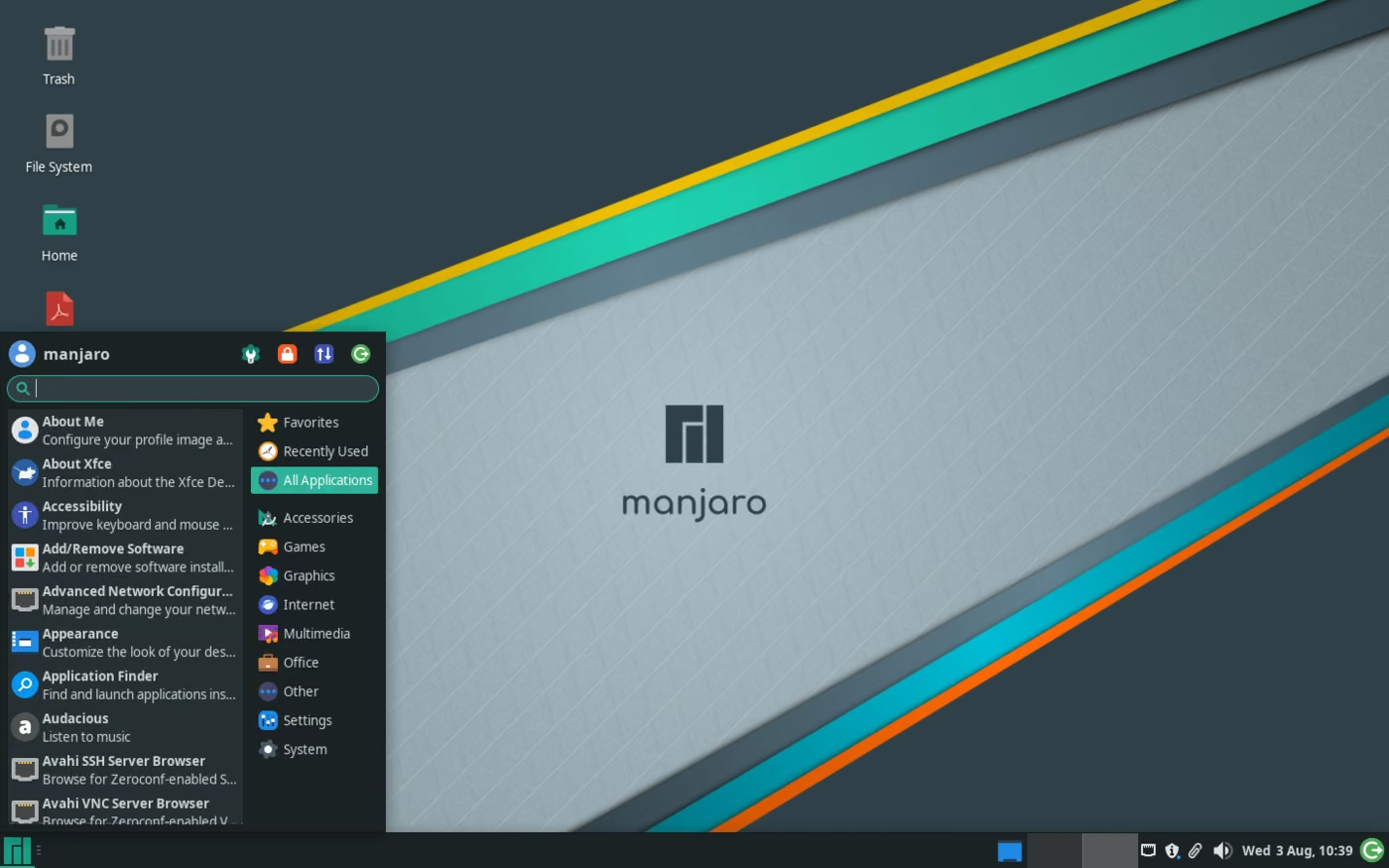
Installing software through Flatpak is simple, updates are handled automatically, and many gaming applications such as Steam, Discord, OBS Studio, and other tools are readily available.
For anyone who wants to try Linux without having to build everything from scratch, Manjaro is a great place to start.
Conclusion: The future of Linux gaming
Linux gaming is no longer what it was ten years ago. Thanks to Steam, Proton, SteamOS, and the Steam Deck, there are now thousands of games that run very well on Linux.. Tools such as Heroic Games Launcher, Lutris, Prism Launcher, Sober, and cloud gaming through GeForce NOW also give Linux users more options than ever before.
Will Linux become bigger than Windows for gamers tomorrow? Probably not. Windows remains the dominant platform for now, especially because of certain anti-cheat systems and exclusive software. Still, the idea that Linux isn't a suitable gaming platform is long outdated.
Are you new to Linux? Then I recommend simply starting with Steam and its built-in Proton support. If you want more freedom later on, you can gradually experiment with Heroic, Lutris, GE-Proton, and other tools. That way, Linux grows with you—from beginner to advanced user.
The future of Linux gaming is no longer just a promise.
It's already here.

Webmastahhh is the creator of Mastanet, a gaming and technology website where he shares news, reviews, guides and personal insights about games, hardware, software and the future of digital entertainment.










 You may also like


 0
0


